
Post
ssg 1.9.10: A Shop on a Static Site
You write and publish with ssg, and now you want to sell a few things from
the same site: an ebook, a template pack, a recording. 1.9.10 adds a shop
template for that, the ecommerce worker, together with a storefront theme
(picostore) and a complete example (examples/ebook-shop).
This post covers what the shop is, how it fits next to static pages, one order from the basket to the invoice, the admin panel, the money rules, and the product feeds for AI agent platforms. It ends with what the shop does not do and what was not tried.
About the screenshots. They come from a local run. The storefront was
built by ssg from examples/ebook-shop. The shop's own code ran on the
repository's test stand-ins for D1, R2 and KV. Stripe and the mail API were
replaced by local fakes: no payment account was used, no money moved and no
email was sent. The panel screens with many orders use the shop's built-in
demo data. All data in the screenshots is fictional: the books, their
authors (such as "Tomasz Wierzbicki" and "Maria Halloran"), the buyers in
the order lists, the order and invoice numbers and the amounts were made up
for the example and its tests. Any resemblance to real people is
coincidental, and every address is on an example domain.
What it is, and what it is not
The shop sells digital products: files a buyer downloads after paying. It is meant for one seller with a few products and one person looking after it. It is not a platform. It has no stock control, no physical shipping, no subscriptions and no coupon codes.
ssg sells nothing. The shop is a template you deploy on your own Cloudflare account. You choose and contract your payment provider. Your keys and your buyers' data stay in your account.
The code supports two payment providers, Stripe and PayPal. A new shop offers both, Stripe's button first. Each one appears at checkout only when its secrets are set.
How it fits a static site
ssg builds the pages: the product pages, the basket, the checkout form, the thank-you page, the terms. They are ordinary static files.
Everything that must happen on a server is in the worker, under
/api/shop/*. It runs as Cloudflare Pages Functions:
POST /api/shop/checkoutturns a basket into an order and a payment URL;POST /api/shop/webhooks/stripeand/webhooks/paypalhear from the provider that the money arrived;GET /api/shop/download/:tokenstreams the file, withRangesupport;GET /api/shop/invoices/:numbershows an invoice as printable HTML;/api/shop/admin/*is the admin API behind the panel at/ecommerce-admin/.
Orders, invoices and settings live in D1. The files you sell live in R2. Rate-limit counters live in KV. There is no migration step: the worker creates and updates its own tables on the first request. The deployed tree is the source tree, with no npm packages at runtime.
In .ssg.yaml, the example connects the two with a workers: entry:
1workers:
2  - name: shop
3    dir: workers/ecommerce
4    routes_include:
5      - /api/shop/*
ssg copies the worker's functions/ into the output and routes only
/api/shop/* to them. Every other path stays a static file.
Setting it up from the example
examples/ebook-shop is a small publisher with two books, a basket, eight
countries and the panel. Its README has the full steps. In short:
1cp examples/ebook-shop/.dev.vars.example examples/ebook-shop/.dev.vars
2cd examples/ebook-shop
3ssg --config ssg.yaml --watch      # builds and starts wrangler pages dev
4sh scripts/seed.sh                 # seller details, two products, their PDFs
seed.sh uses the same HTTP API as the panel. It writes the seller's
details, creates both products, uploads their files to R2 and puts them on
sale. Prices in the example are in EUR.
Before real money, the example's README lists what to replace: real D1, R2
and KV ids in wrangler.toml, secrets set with
wrangler pages secret put rather than .dev.vars, a long admin password
(or another sign-in mode, below), and your own terms and privacy pages. The
panel's Overview lists whatever is still missing.
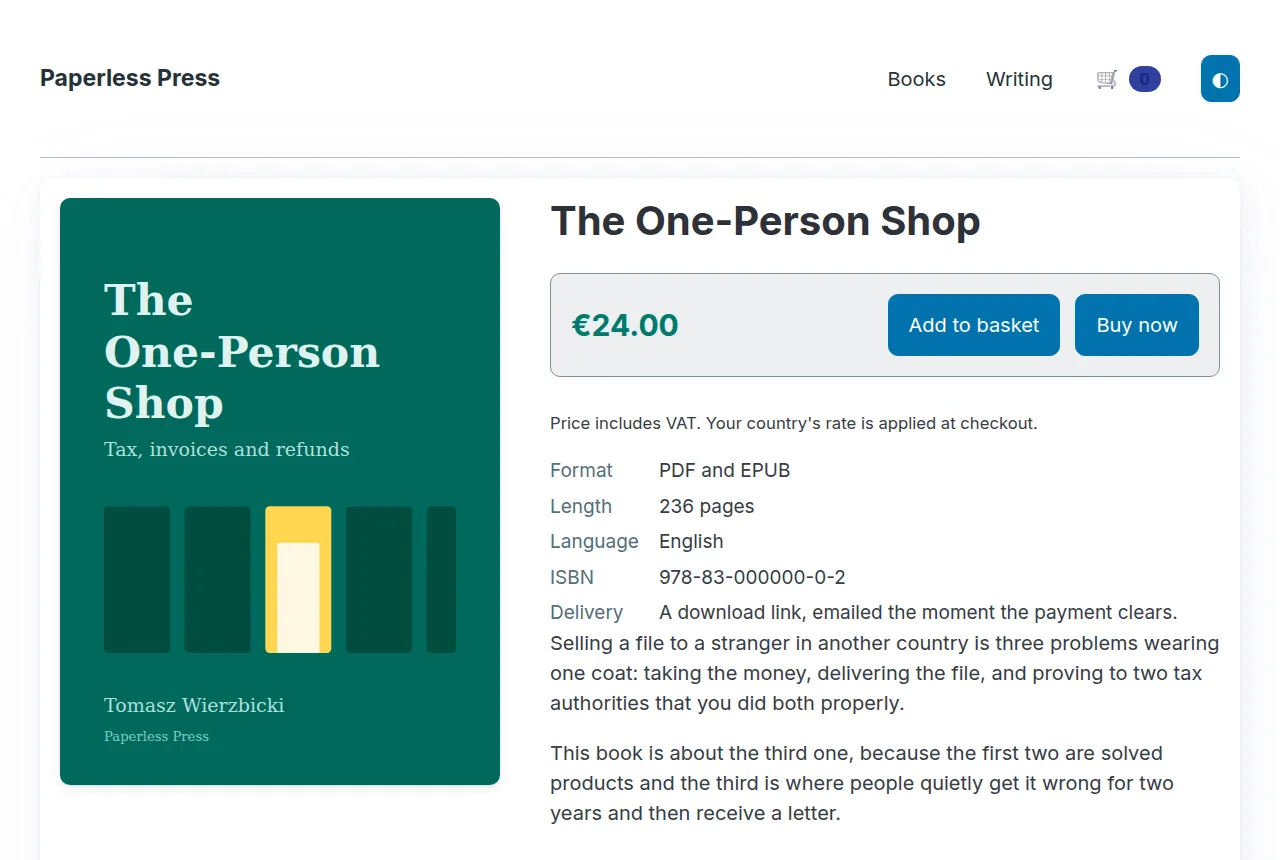
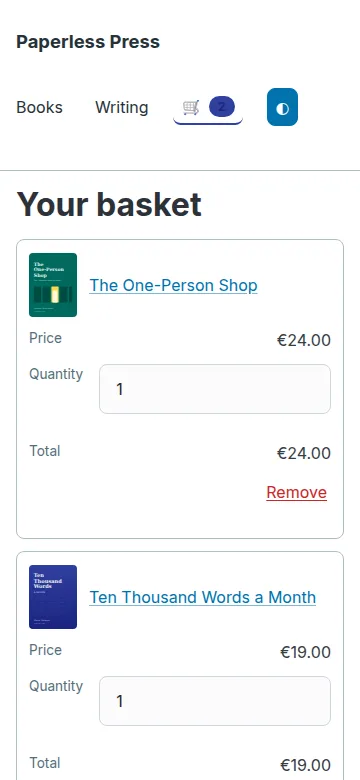
The product page and the basket are part of the picostore theme. The basket
lives in the browser's localStorage. It is a convenience only: the server
prices every order again.
A first order, end to end
Checkout. The buyer gives an email address, an optional name, a country and, for a business, a VAT number. A digital download ends the buyer's right of withdrawal in the EU, so the form asks for that consent before payment. The marketing box is optional and unticked.
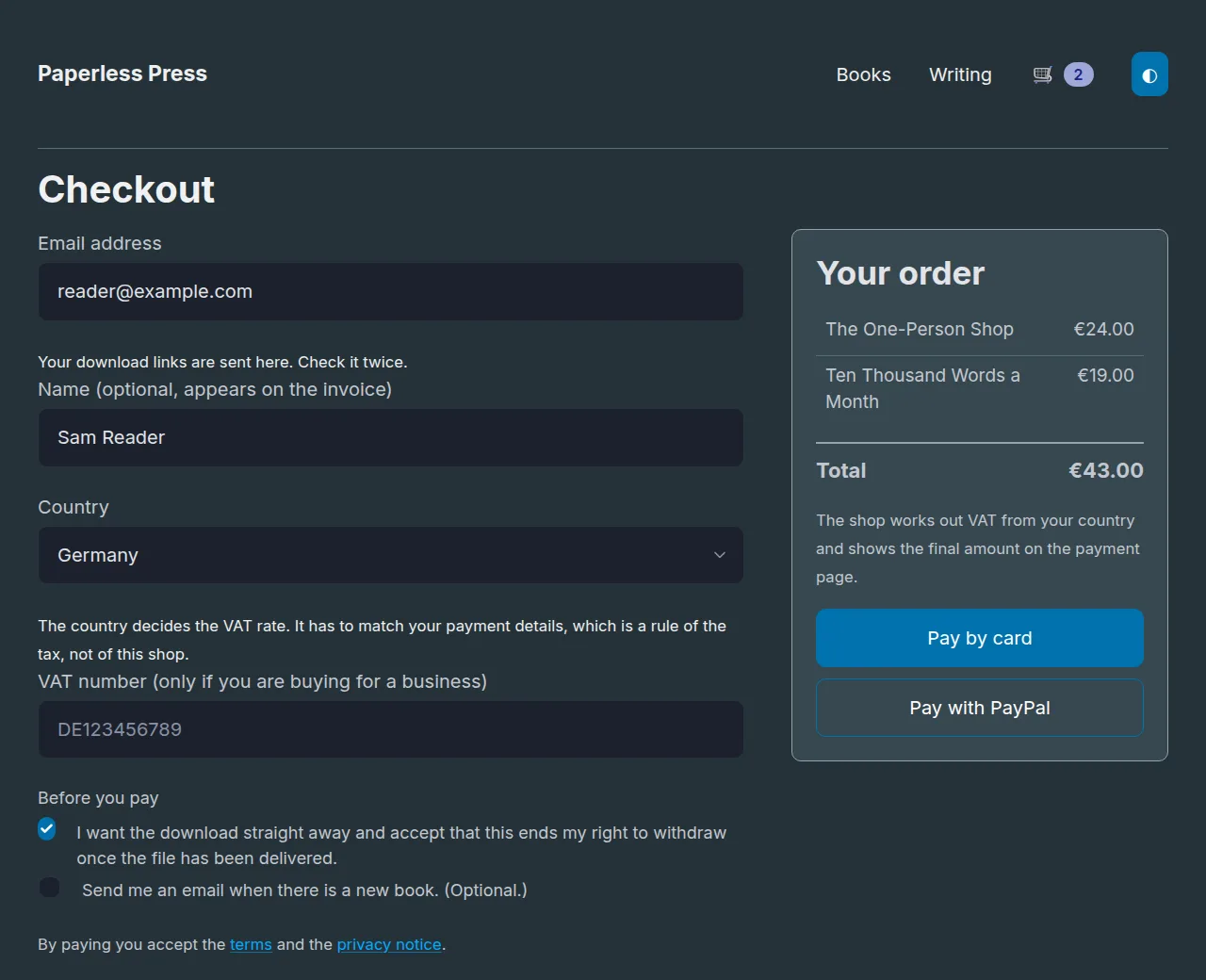
The form sends product codes and quantities, nothing else. The worker reads
prices and the VAT rate from its database, writes the order as pending,
asks the provider for a payment page and records the provider's reference.
The call to the provider comes last. If it fails, the order stays pending
with no reference, and the panel shows it.
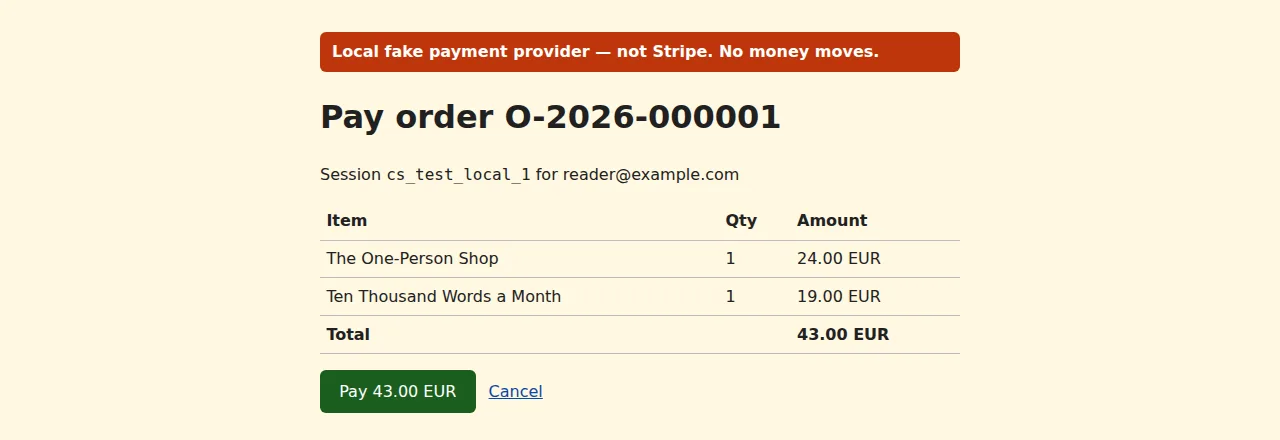
Payment. Here the run used a local fake in place of Stripe. It showed the
amount the shop had asked for. "Pay" sent a checkout.session.completed
webhook signed with the webhook secret, as Stripe signs it.
The shop checked the signature and the timestamp and recorded the event so that a repeated delivery does nothing. Then it ran fulfilment:
- the order moved to
paid; - invoice
FV/2026/000001was issued; - one download token was created for each book;
- the buyer's email and a note to the owner were queued in the outbox.
The thank-you page does not trust the redirect back from the provider. It polls the order's status until the webhook has arrived.
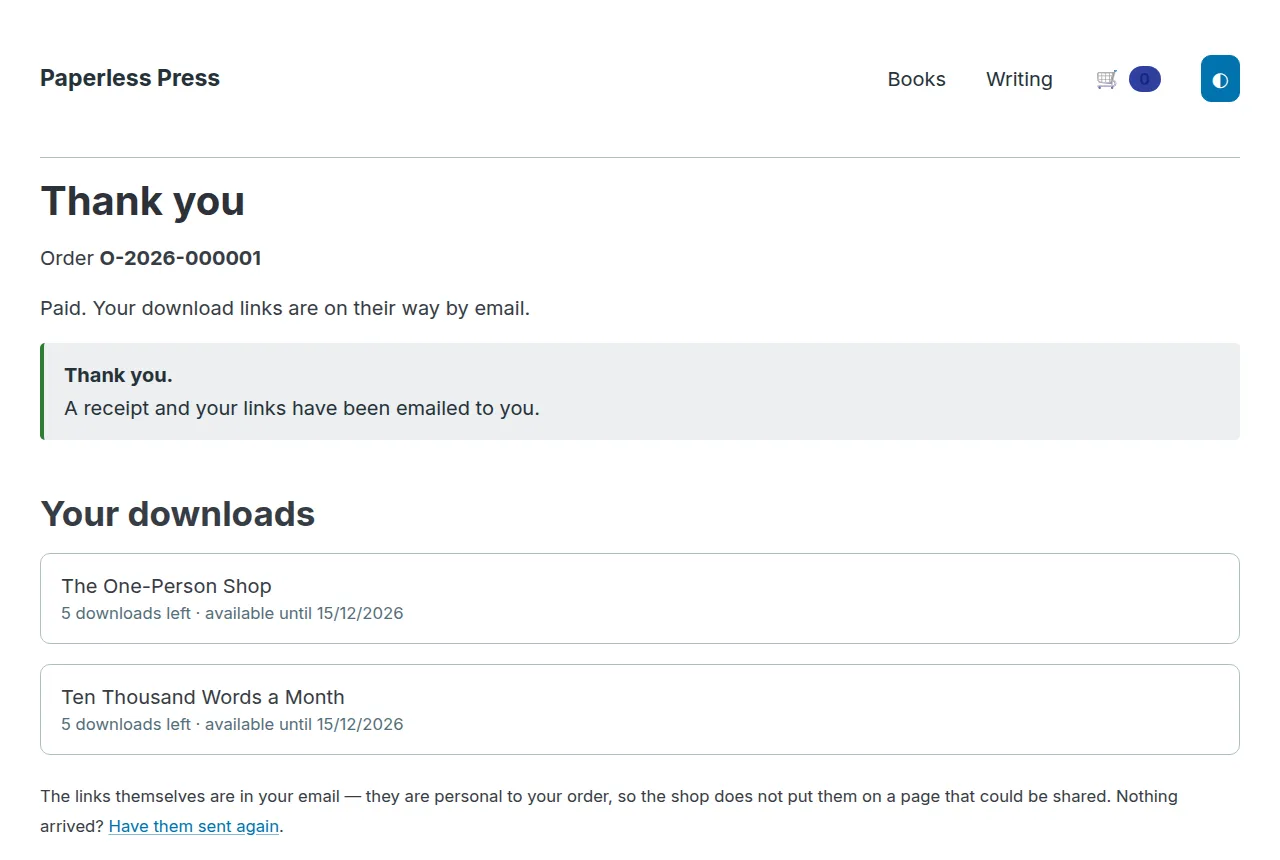
The links are not on that page. They go by email, because they are personal to the order and a page can be shared.
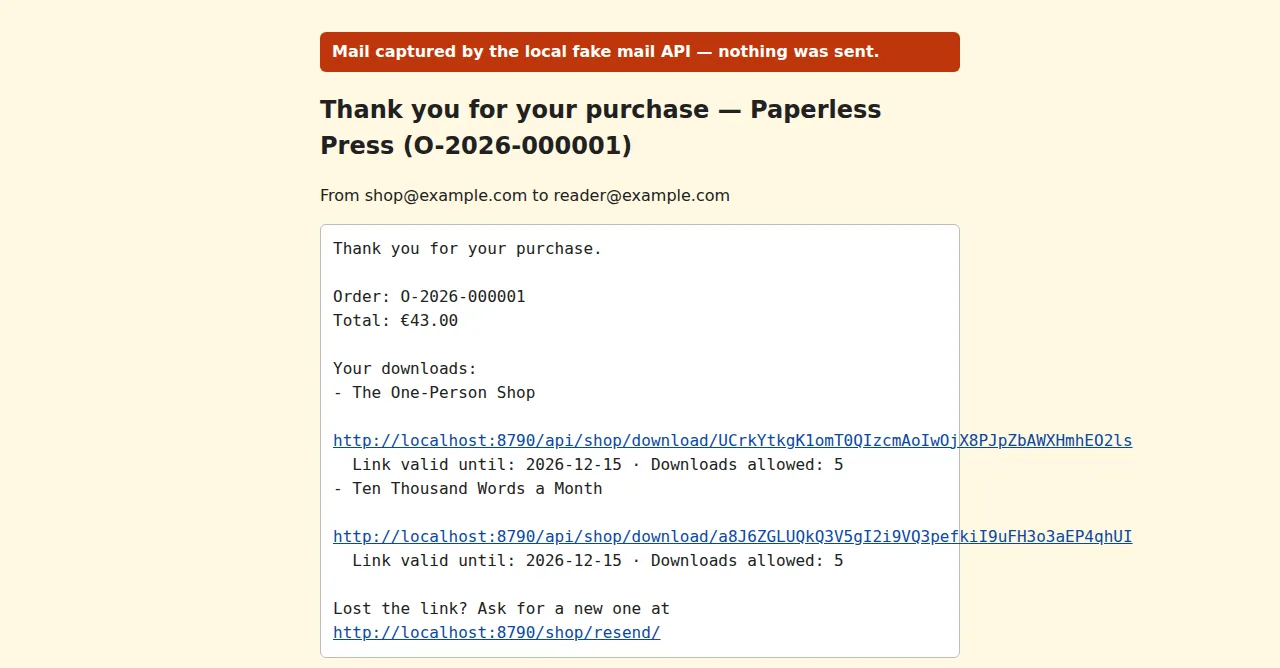
The shop stores only a hash of each download token. A link works for a set
number of downloads and days; the defaults are 5 and 30, set per product.
In the run, the link returned the PDF with content-disposition: attachment,
and a ranged request was answered with 206. A buyer who lost the email
asks for the links again at /shop/resend/.
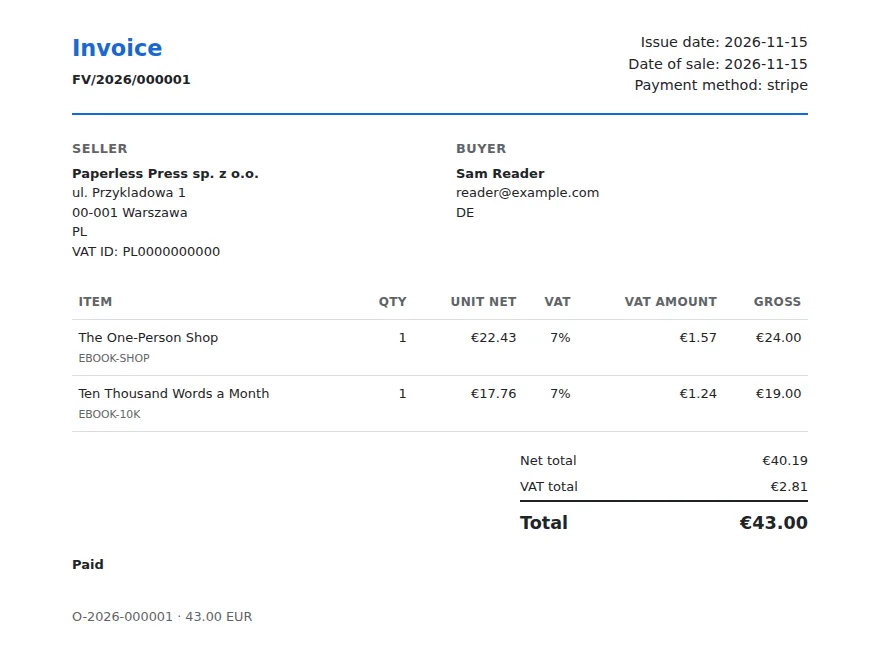
The invoice is HTML that prints to A4, so the buyer can save it as a PDF from the browser. Everything on it is frozen when it is issued. A later change to your address or a price does not change an invoice already sent.
The admin panel
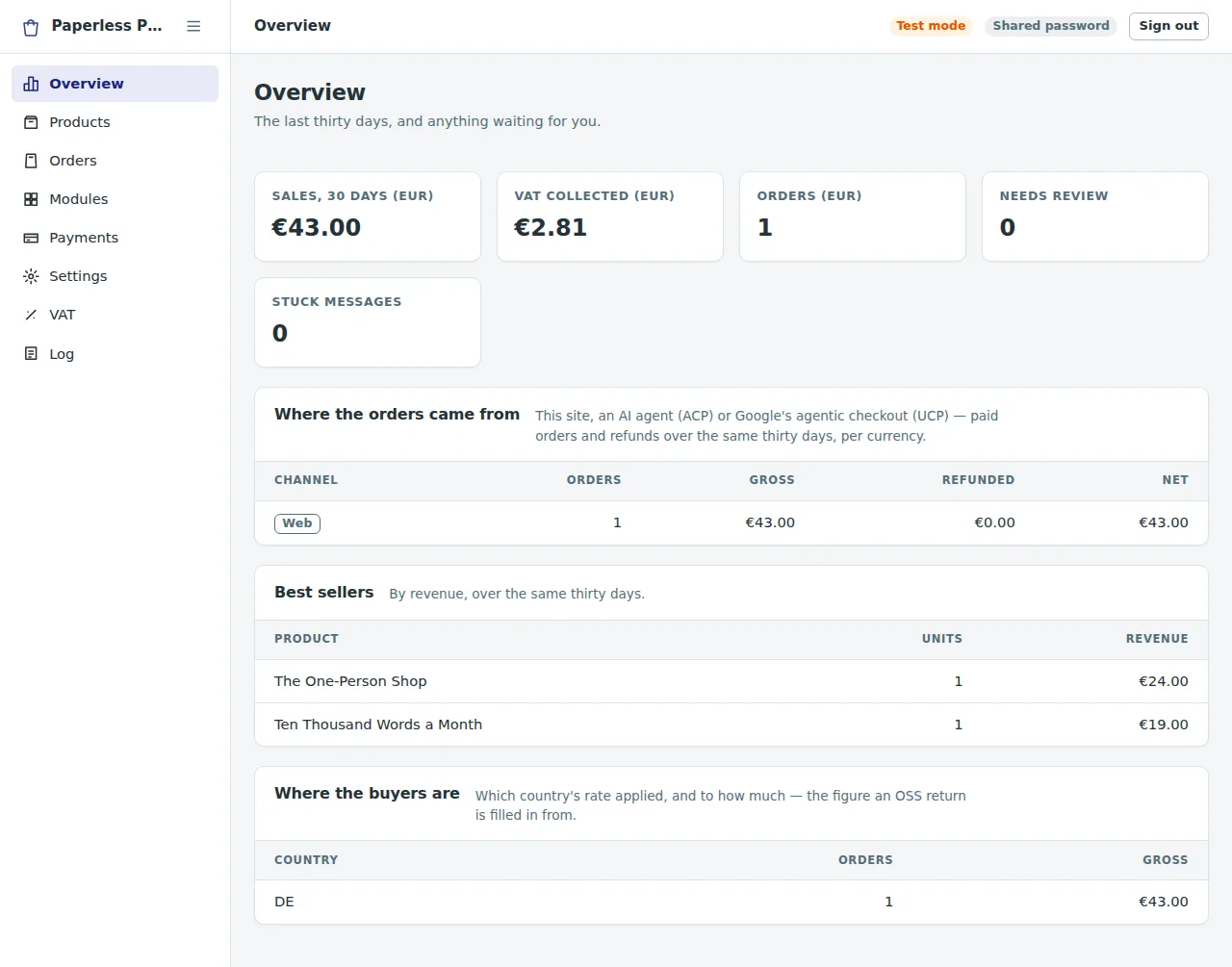
The panel is at /ecommerce-admin/. Its Overview shows the last thirty
days: sales and VAT collected per currency, orders waiting for a review,
messages that keep failing, where the orders came from, best sellers, and
sales per country. The last table holds the figures a one-stop-shop (OSS) VAT
return is filled in from.
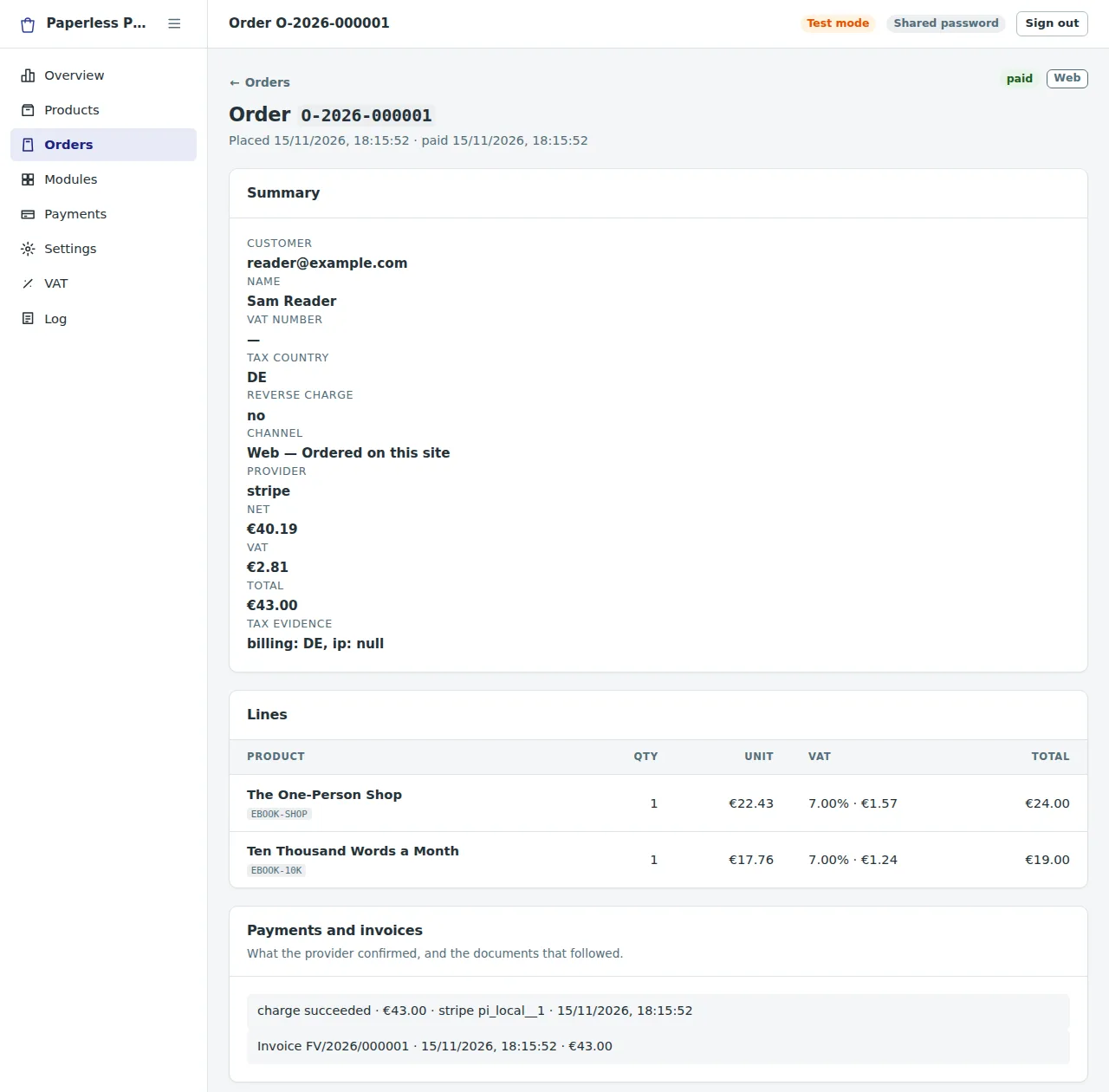
An order shows the buyer, the tax country and the evidence for it, each line with its VAT, what the provider confirmed, the invoice, and how the download links are being used. From there you can send the links again, refund through the provider, mark an order paid by hand, or add a private note.
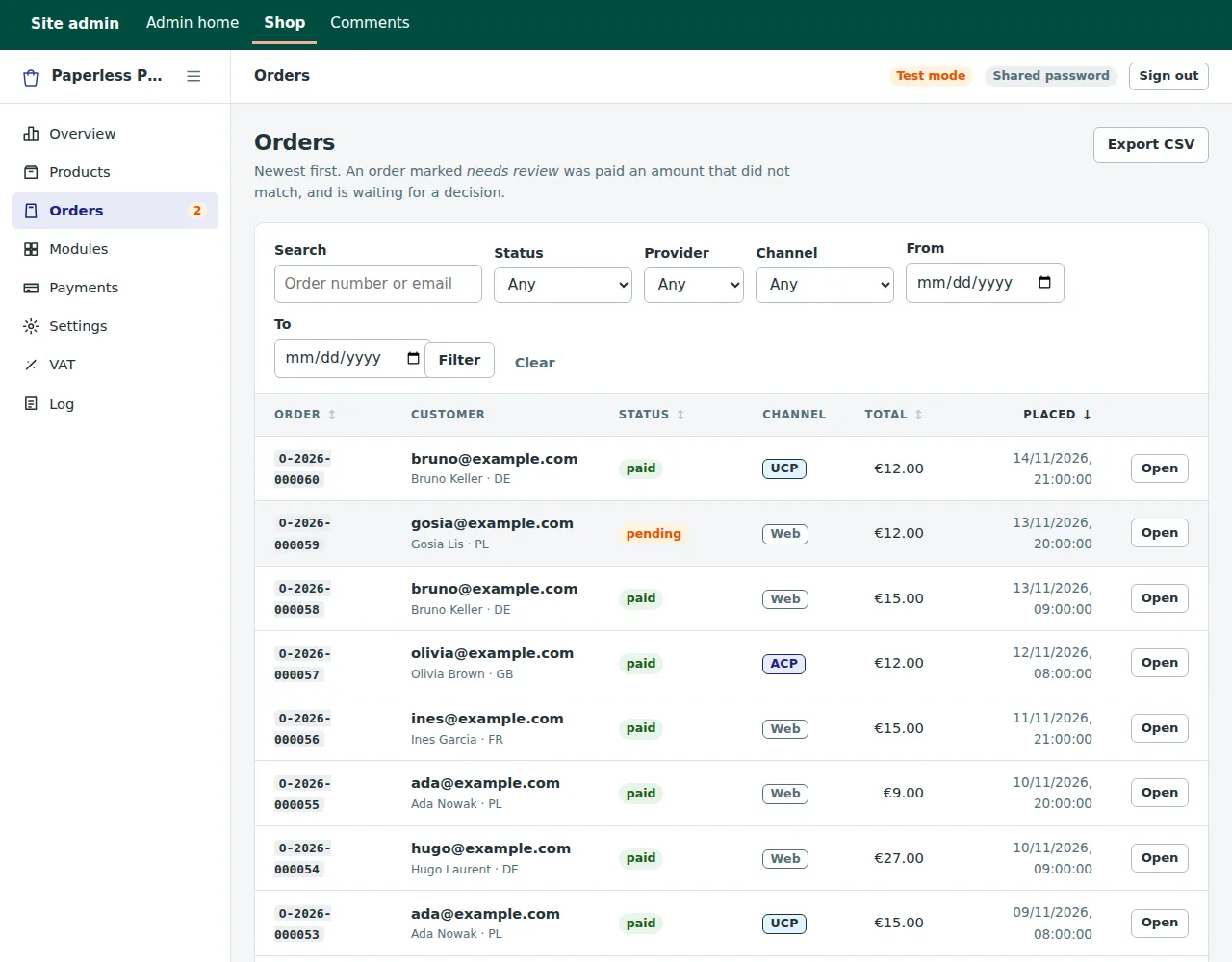
The order list is filtered, sorted and paged by the API, with a cursor, so the browser never loads every order at once. Every order carries its channel: Web (your own checkout), ACP or UCP (the agent checkouts described below).
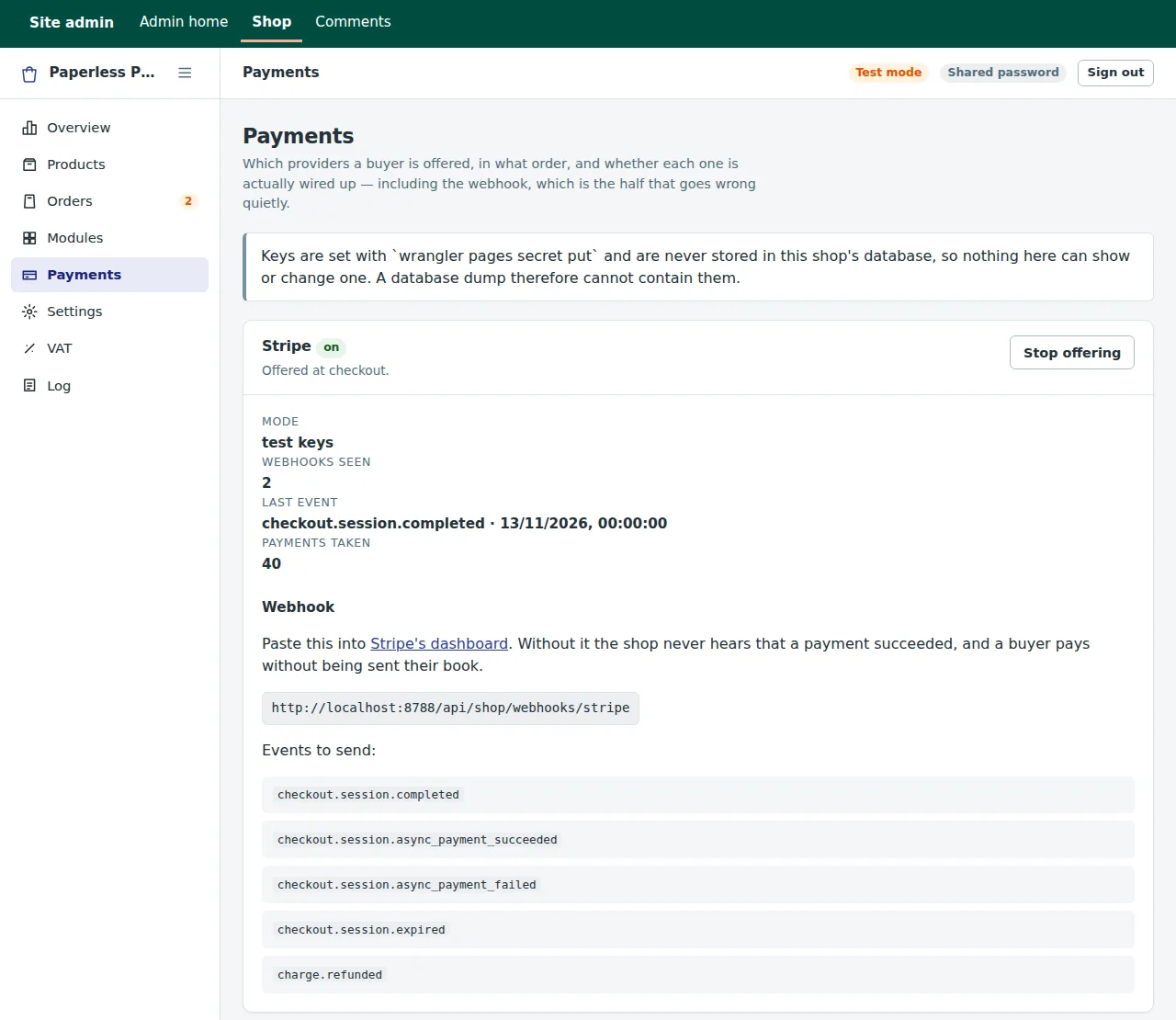
Payments shows each provider's state without showing any key. Keys are Wrangler secrets. They are never in the database, so a database export or a look over your shoulder cannot reveal them. The screen shows what sellers usually get wrong instead: whether each provider is set up, test or live keys, the exact webhook URL to paste into the provider's dashboard, the events to send, and whether a webhook has ever arrived.
The panel also has Products (prices per currency, the file, download limits), Modules (switch invoices, emails, owner notices, webhooks, tracking, Turnstile and the resend page on or off), Settings, VAT and Log, the audit log. It works on a phone and in dark mode.

Who can sign in: password, Access or auth
The panel uses the same three sign-in modes as the other workers' panels.
With none of them set, the admin API answers 503. It is never open by
default.
- A shared password (
SHOP_ADMIN_PASSWORD) for one person. Wrong passwords are counted per address, and the address is locked out for a while after too many. - Cloudflare Access, if you already use it: the shop checks the token Access signs.
- The
authworker, for several people with different permissions. The shop declares six:ecommerce:read,:orders,:refund,:products,:settingsand:export. Refunding money and exporting buyers' data are separate permissions on purpose. A script, such as the monthly export for your accountant, uses anauthservice token. Service tokens may call a few read-only routes and nothing that changes the shop.
With the core worker on
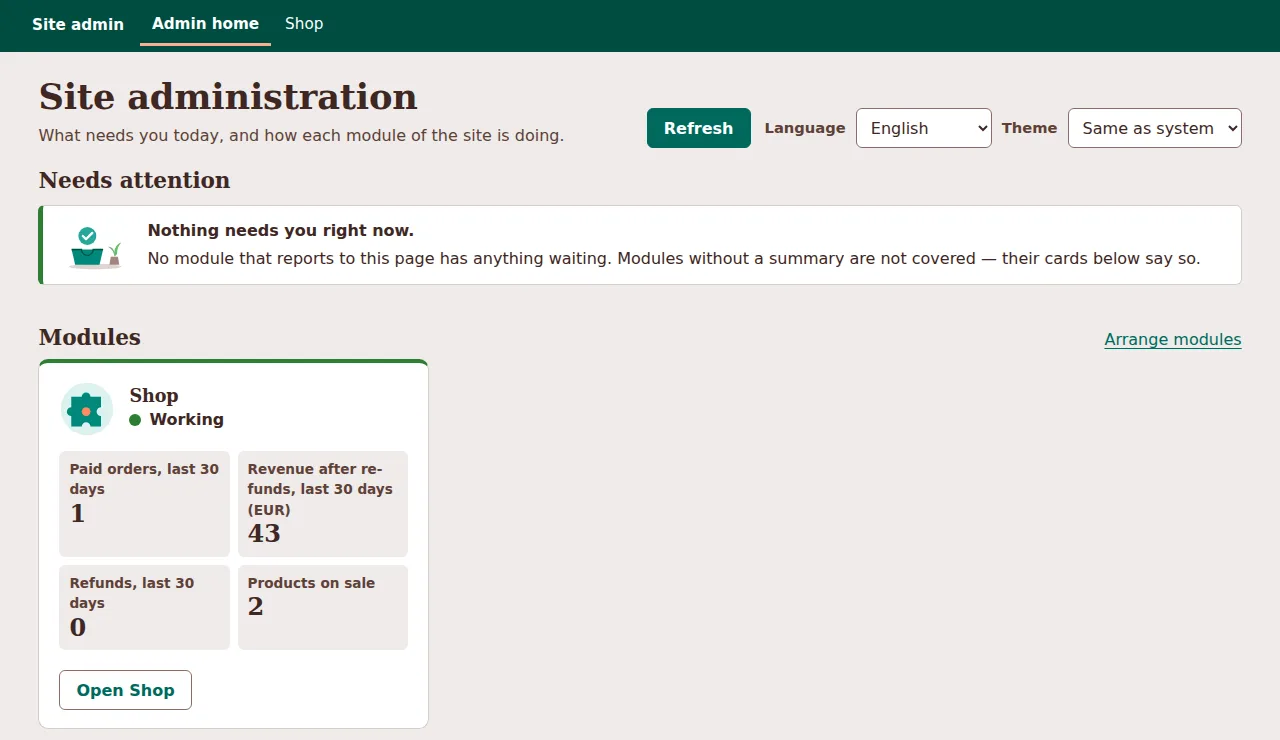
the site, the shop appears on the admin home page with its own summary.
The summary holds counts only, never a buyer's name or address. Without
core, the panel looks exactly as it does alone.
Money rules
- Gross prices by default. The price on the page includes VAT. The buyer's country decides how much of it is tax. In the run, a German buyer paid €24.00 for the first book: €22.43 net and €1.57 VAT at Germany's 7% ebook rate. Net pricing is a setting.
- Integers in minor units. Every amount is an integer in the currency's smallest unit (2400 means €24.00), with half-up rounding. Currencies with zero or three decimals are handled.
- The server prices every order. A price posted to the checkout is ignored.
- Invoices numbered without gaps. The number comes from a counter per
series and year (
FV/2026/000001by default; the format, series and the credit-note series are settings). A refund issues a credit note in its own series rather than changing the invoice. - VAT from a table. The shop starts with the EU and UK rates and keeps
a history: a new rate takes effect from a date and does not overwrite the
old one, so an old invoice still explains the rate it used. The panel warns
when the newest rate is over a year old. The seeded rates are a starting
point, not tax advice. The tax mode can also be
noneorstripe(Stripe Tax computes it). - Reverse charge needs verification. VAT numbers are not checked against VIES yet, so a well-formed number alone does not remove the VAT.
- Safe to run twice. Each step checks whether it has already happened. Two webhooks arriving together produce one invoice and one email.
Product feeds for AI agent platforms (ACP and UCP)
Some AI agent platforms read a product feed to show a shop's products, and some can buy through a checkout API on the shop's side. 1.9.10 adds both halves:
- At build time, ssg writes the feeds.
format: acpwrites an Agentic Commerce Protocol product feed as JSON Lines. Aucp:key on agoogle-merchantfeed adds the Universal Commerce Protocol attributes. Both read the products from the page'sProductJSON-LD and itsmerchant:front matter, the data the Merchant feed already used. check_acpandcheck_ucpreport every problem by file and field. Set them towarn, orstrictto fail the build.- In the shop, ACP and UCP checkout endpoints take orders from an agent at the same prices and VAT as the web checkout. They are off until you switch them on.
In the run, an ACP feed was added to the example with two product pages
given Product JSON-LD. One page had no description and no currency on
its price. The build said so:
1🛒 Checking the ACP product feed...
2   ⚠️  ACP feed in content/shop/pages/ten-thousand-words.md → acp.jsonl item EBOOK-10K: availability — in_stock is stated by no page; set offers.availability or merchant.availability
3   ⚠️  ACP feed in content/shop/pages/ten-thousand-words.md → acp.jsonl item EBOOK-10K: description — required and missing — the row is left out
4   ⚠️  ACP feed in content/shop/pages/ten-thousand-words.md → acp.jsonl item EBOOK-10K: price — 19.00 has no currency; set offers.priceCurrency — the row is left out
The other page became one row:
1{"item_id": "EBOOK-SHOP", "title": "The One-Person Shop", "url": "https://example.com/the-one-person-shop/",
2 "price": "24.00 EUR", "availability": "in_stock", "is_digital": true,
3 "seller_name": "Paperless Press", "target_countries": ["DE"], "store_country": "PL", "…": "…"}
The example's product pages keep their price in front matter for the theme,
and they have no Product JSON-LD. Add it before you publish a feed. The
feed shows the price on the page, while every checkout charges the price in
the shop's database. The build cannot see that database, so keeping the two
the same is your job.
What is the owner's step. ssg writes and checks the files. Applying to an agent platform, accepting its terms, the payment account it requires and any certification are yours, and being accepted is the platform's decision. Which platforms read which feed, and whether one connects to a merchant's own checkout, changes often. ACP and UCP record what the public pages said on 2026-11-15, with sources. UCP.md also notes that Google lists some digital goods as ineligible for its checkout, and that it is not stated whether ebooks fall under that. Neither checkout was certified or tried against a live platform. They were tested against fakes built from the published specifications.
What it does not do, and what was not tried
- Digital products only. No physical shipping, no stock, no subscriptions, no coupon codes.
- No PDF invoices. The HTML invoice prints to A4.
- No VIES check of buyers' VAT numbers.
- The agent checkouts charge through Stripe only. The ACP checkout has no 3-D Secure step and does not tell the platform about later refunds.
- Not tried live. No Stripe or PayPal account was used. The payment page, the webhook and the mail API in the screenshots were local fakes, and the database ran on SQLite in Node, not on Cloudflare. The shop's tests run the same way.
Read on
- The shop worker's README: setup, secrets, the sign-in modes, rate limits, the module switches.
- The example shop.
- Admin guide, section 10: selling, and selling through AI agents.
- ACP, ACP-OPERATIONS, UCP and UCP-OPERATIONS: the feeds and the agent checkouts, step by step.
- Feed configuration:
format: acp,ucp:,check_acpandcheck_ucp.