
Guide
Templates and themes
Two halves: the themes you can use as they are, and how to write one of your own — the file layout, the values in scope, and which template renders what.
Go template helper signatures are in TEMPLATE_HELPERS; image functions are in IMAGES.
Ready-made themes
Five themes ship with SSG. simple, krowy and apidoc are embedded in the binary and
scaffolded into an empty theme directory the first time you name one; imd and
ssgtheme live in the repository, so copy the directory you want into your own
templates/.
The screenshots below are each theme's own demo content, built and captured from this repository.
-

simple— a minimal blogDark by default, one accent colour, cards for the post listing. The smallest theme in the set and the one to start from when writing your own.
Embedded · scaffolded byssg init -

krowy— a fuller blog with a sidebarA wider layout with a sidebar for recent posts and categories, a photo strip in the header and a textured background. The one to look at for a content-heavy site.
Embedded · used by the examples -
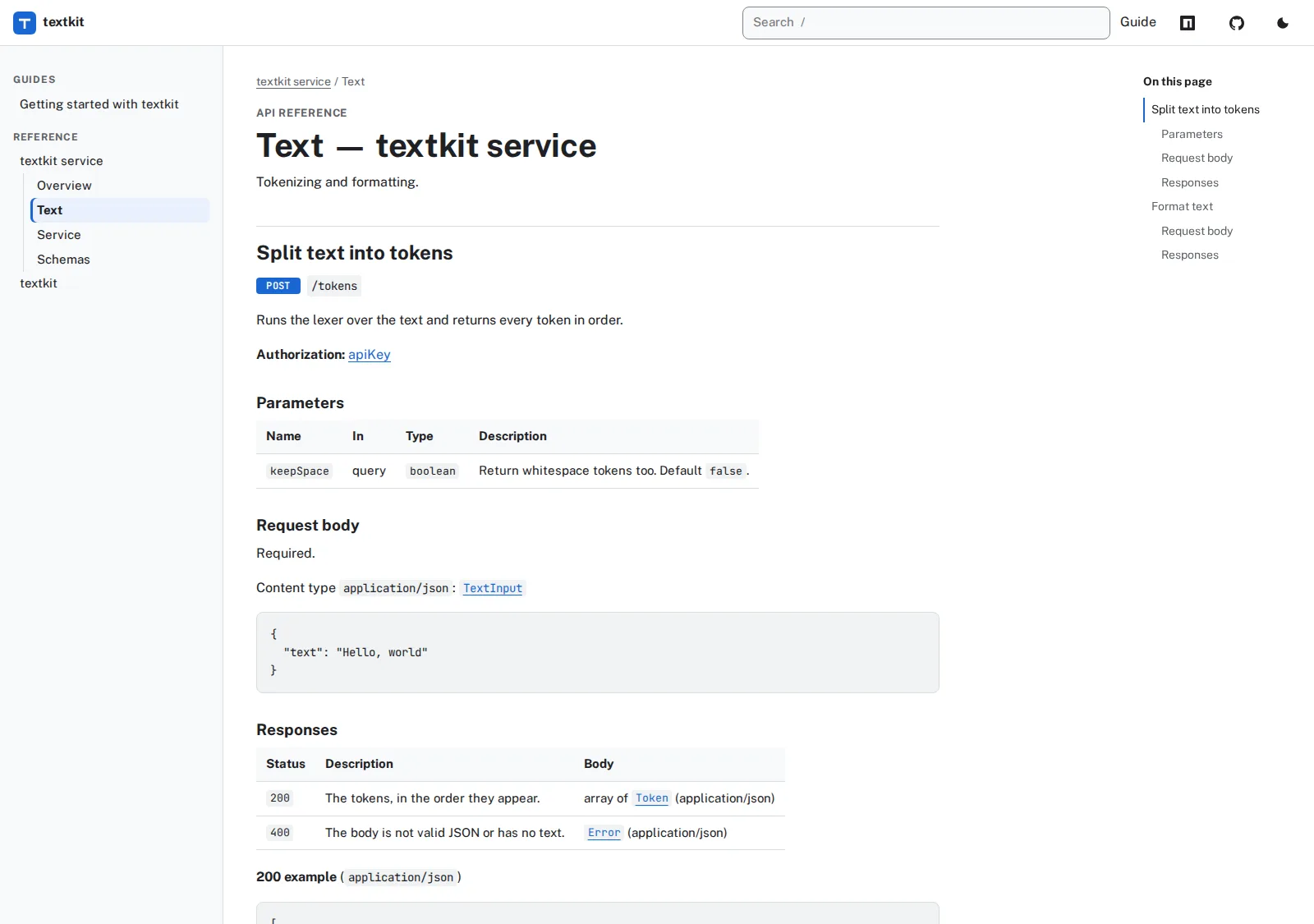
apidoc— documentation and API referenceGuides, references generated from code and REST references from OpenAPI in one sidebar, with search, an "On this page" column, live examples and the Try it console.
Embedded · README -

imd— a corporate landing pageA marketing layout rather than a blog: hero with a call to action, a statistics panel, a partner strip.
In the repository · copytemplates/imd/ -
ssgtheme— documentation sitesThe theme this documentation is built with: card grids, a guide layout with the sidebar you are reading beside, a colour-scheme switch and shared chrome in
In the repository · READMEpartials/. You are looking at it.
Selecting a theme
The second positional argument names a directory below templates_dir:
1ssg my-blog my-theme example.com
With default paths, the theme is templates/my-theme/.
Downloading a theme
A theme can be fetched before generation:
1ssg my-blog some-theme example.com \
2  --online-theme=https://github.com/user/some-theme
GitHub, GitLab and direct ZIP URLs are accepted. Only ZIP archives are extracted — a tar URL is rejected up front rather than downloaded in full and then failing.
Themes laid out for other generators often work. An archive whose templates
live under layouts/ alongside static/ or assets/ — the conventional
layout for Hugo themes — is converted into SSG's structure during extraction, so
a theme written for that layout can be a starting point rather than a rewrite.
How much of it works depends on the template syntax it uses: see
template engines for the alternatives SSG can render.
Downloaded code and templates should be reviewed before use. A theme is executable template code, and extraction is bounded (100 MB per entry, 10 000 entries) but not a sandbox.
The rest of this guide is for writing or modifying a theme.
Theme structure
 1templates/my-theme/
 2├── base.html
 3├── index.html
 4├── page.html
 5├── post.html
 6├── category.html
 7├── tag.html               # optional; falls back to category.html
 8├── author.html            # optional; falls back to category.html
 9├── series.html            # optional; falls back to category.html
10├── layouts/
11│   └── landing.html       # optional page layout
12├── partials/              # theme-owned organisation/assets
13├── shortcodes/
14│   └── promo.html
15├── css/
16├── js/
17└── images/
Standard template roles:
| File | Renders |
|---|---|
index.html |
Homepage and paginated homepage pages |
page.html |
Normal pages |
post.html |
Posts |
category.html |
Categories and fallback for other archives |
tag.html |
Tag archive when present |
author.html |
Author archive when present |
Define names must match file names. Templates are selected by their
define name, not the file name. If your theme wraps templates in
{{define "…"}} blocks, copying category.html to author.html is not
enough — the copy still defines category.html. Rename the define to
author.html to activate it. Since v1.8.5 such a "shell" file falls back
gracefully (never a blank page) and the build prints a warning naming the fix.
Themes without `` blocks are matched by file name and need no
renaming.
| series.html | Series archive when present |
| layouts/<name>.html | A page with frontmatter layout: <name> — the file may define either <name>.html or layouts/<name>.html; both resolve |
| <name>.html | A page with frontmatter template: <name> |
Custom layout and template selection currently applies to pages. Posts use
post.html. If a page's selected custom template is absent, SSG falls back to
page.html.
For the Go engine, when the theme root contains no .html files, SSG creates
the five standard templates. If any root HTML template exists, the theme is
treated as intentional and missing files are not individually scaffolded.
Non-Go engines never receive generated templates and must ship all templates
they need.
Theme assets and their output URLs
A theme's css/, js/ and images/ directories are copied to the output root
under the same name, so a template references them by an absolute path:
| Theme directory | Copied to | Reference in a template as |
|---|---|---|
<theme>/css/ |
output/css/ |
/css/<file> (e.g. /css/style.css) |
<theme>/js/ |
output/js/ |
/js/<file> (e.g. /js/main.js) |
<theme>/images/ |
output/images/ |
/images/<file> (e.g. /images/logo.svg) |
So a theme whose files are templates/my-theme/css/style.css,
.../js/main.js and .../images/logo.svg links them as:
1<link rel="stylesheet" href="/css/style.css">
2<script src="/js/main.js" defer></script>
3<img src="/images/logo.svg" alt="Logo">
The subdirectory name is preserved verbatim — nothing is renamed or flattened,
and only these three directories are treated as theme assets (other top-level
theme directories such as partials/, shortcodes/ and layouts/ are template
sources, not copied as assets).
The media/ directory in the generated-output tree is not a theme
directory: it holds media copied from the content source
(content/<source>/media/ → output/media/), independent of the theme.
Build transforms (SCSS compilation, bundling, minification, fingerprinting) run
after this copy, operating on the files already sitting at output/css/ etc.
Precedence with static_dir. The project's static directory (static/ by
default, or whatever static_dir: names) is copied verbatim to the output
root after the theme assets. When a static file and a theme asset resolve to
the same output path — e.g. static/css/style.css and <theme>/css/style.css
both land at output/css/style.css — the static file wins: it is copied
last and overwrites the theme's copy. Use this to override a single theme asset
per project; keep static paths clear of the theme's css/, js/ and images/
if you do not intend to shadow it.
Template loading and sharing
Three directories are parsed, in this order, into one template set:
| Parsed | Contents |
|---|---|
<theme>/*.html |
the role templates above |
<theme>/layouts/*.html |
per-page layouts selected by frontmatter layout: |
<theme>/partials/*.html |
shared `` blocks, callable from any of the above |
Because it is one set, a {{define "site-header"}} written in
partials/chrome.html is callable from index.html, post.html or a layout —
that is how a theme keeps its <head>, header and footer in one place instead
of copying them into every role file:
{{/* partials/chrome.html */}}
{{define "site-header"}}
  <header>…{{ .Domain }}…</header>
{{/* page.html */}}
{{ template "site-header" . }}
Pass a computed context with dict when a partial needs values the caller
knows:
{{ template "site-head" (dict
    "Title" (printf "%s — %s" .Page.Title .Domain)
    "Canonical" (printf "/%s/" .Page.Slug)
    "Ctx" .) }}
Notes that save a debugging session:
-
Only
.htmlfiles are parsed. Other files underpartials/are neither parsed nor copied to the output; public assets belong incss/,js/orimages/, which are the only theme directories copied verbatim. -
A file whose defines do not match its filename renders nothing on its own. That is exactly what makes
partials/chrome.htmlwork — and why acategory.htmlcopied toauthor.htmlstill needs its define renamed (see the warning described above). -
base.htmlis part of the scaffolded starter themes and is only used by a theme that chooses to define and call it; it is not a required file and SSG never invokes it implicitly. -
Templates are parsed once per build, after content is loaded, so site data is fully available to every helper.
-
An HTML comment written in a template does not reach the output. Go's
html/templatestrips comments while parsing — long-standing and reasonable on its own terms, and silent: no error, no warning, output missing something you wrote. It matters because every comment-based host directive is affected, not just a note to yourself:<!--email_off--> {{/* Cloudflare Email Obfuscation opt-out — VANISHES */}} {{ "<!--email_off-->" | safeHTML }} {{/* survives */}}The same applies to SSI/ESI markers (
<!--#include …-->), CDN and tag-manager markers, and any build-provenance comment a theme wants to emit. Wrap the comment insafeHTMLwhenever it is meant for something downstream to read.It then survives
minify_htmltoo. Until 1.8.59 minification deleted every comment but the conditional<!--[if …]>, so thesafeHTMLform worked with minification off and silently did nothing with it on — which is how most production builds run. The directives kept by default are<!--[if,<!--email_off,<!--/email_off,<!--#(SSI),<!--esi,<!--googleoff,<!--googleon,<!--noindex,<!--/noindexand<!--htmlmin:keep. A host that reads something else is covered byminify_html_keep_comments:1minify_html_keep_comments: [acme:begin, acme:end]An ordinary comment — a note to yourself — is still removed, which is the point of minifying.
The bundled ssgtheme is the reference implementation of this layout:
partials/chrome.html holds the head, header and footer; the four role
templates hold only what is unique to them. See
templates/ssgtheme/README.md.
Marking editable regions
A theme says which parts of a page may be edited in the browser
(ssg --http --watch --edit, see EDITING) with one attribute:
1<h1 data-ssg-edit="frontmatter:title">{{ .Post.Title }}</h1>
2<time data-ssg-edit="frontmatter:date" datetime="{{ .Post.Date.Format "2006-01-02" }}">…</time>
3<p data-ssg-edit="frontmatter:description">{{ .Page.Description }}</p>
The value names the source of the text: frontmatter:<key> opens that field's
control, and body marks the region holding the page's content, inside which a
click on a paragraph, heading, list item or quotation opens that block:
1<div class="post-body" data-ssg-edit="body">{{ .Post.Content | safeHTML }}</div>
Put it on an element the theme already has rather than adding a wrapper, so a published page keeps the markup it had. A region with no attribute is not editable, which is the point — most text on a rendered page did not come from a file's body, and guessing where it came from is how an editor changes the wrong paragraph.
The attribute is free to leave in: a build without --edit removes it, byte for
byte, so a published page carries none of it. ssgtheme, simple and krowy
already have it on their titles.
Template engines
| Engine | Configuration | Aliases | Syntax |
|---|---|---|---|
| Go | engine: go |
default | html/template |
| Pongo2 | engine: pongo2 |
jinja2, django |
Jinja2/Django-like |
| Mustache | engine: mustache |
— | Logic-less Mustache |
| Handlebars | engine: handlebars |
hbs |
Handlebars |
CLI example:
1ssg my-blog my-theme example.com --engine=pongo2
Syntax comparison:
{{ range .Posts }}
  <h2>{{ .Title }}</h2>
{{ end }}
1{% for post in Posts %}
2  <h2>{{ post.Title }}</h2>
3{% endfor %}
{{#Posts}}
  <h2></h2>
{{/Posts}}
1{{#each Posts}}
2  <h2></h2>
3{{/each}}
Non-Go engines receive the same data model adapted to their renderer. Their
theme files must be written in the selected engine's syntax, and Go template
inheritance (/) does not apply. Rendered Markdown
content is provided as HTML for these engines.
Helper support across engines (GO-054)
SSG hands every engine the same helper library. Pongo2 exposes helpers as
filters ({{ value|helper }}, {{ value|helper:arg }}); Handlebars
exposes them as helpers ({{helper value}}). Mustache is logic-less and
cannot call helpers at all. Anything an engine cannot express is reported once
at build time — never silently ignored.
| Helper group | Go | Pongo2 | Handlebars | Mustache |
|---|---|---|---|---|
Classic (safeHTML, formatDate, stripHTML, default, dict, …) |
✅ | ✅¹ | ✅ | ❌ |
Conditionals (in, contains, startsWith, ternary, matches, …) |
✅ | ✅ | ✅ | ❌ |
Image (imageResize, imageSrcSet, imageInfo, …) |
✅ | ✅ | ✅ | ❌ |
External sources (getExternal, getExternalMeta) |
✅ | ✅ | ✅ | ❌ |
i18n (t) |
✅ | ✅ | ✅ | ❌ |
Collection (where, filter, sort, groupBy, pluck, …) |
✅ | ⚠️² | ⚠️² | ❌ |
¹ Helpers returning HTML are marked safe automatically; pipe through pongo2's
own |safe only if you compose further. ² Helpers with more than two arguments
(pongo2) or more than three (Handlebars), and variadic helpers, cannot be
adapted — calling one raises a visible error (pongo2) or renders a
[helper X error: …] marker (Handlebars) plus a build warning, so the failure
is never silent.
Engine limitations
- Mustache: logic-less by design — no helpers, filters, or expressions. Prepare any derived values in front matter or switch to Pongo2/Handlebars.
- Pongo2: helper results that are already HTML are returned as safe values; plain strings are auto-escaped like any pongo2 output.
- Partials/inheritance: alt-engine themes load each template file independently; use that engine's native include mechanism, not Go's ``.
Rendering contexts
SSG uses different root contexts for individual content and collection pages. Rely on the tables below rather than assuming every value exists everywhere.
Homepage
| Value | Type | Meaning |
|---|---|---|
.Site |
site data | All pages, posts, categories, media and authors |
.Posts |
list | Posts on the current pagination page |
.Pages |
list | All pages |
.Domain |
string | Canonical host |
.Vars |
map | Custom configuration variables |
.Data |
map | YAML/JSON data files |
.Pager |
pager | Pagination state |
.BuildTime |
time | When this build ran — one value for the whole build |
.Modified |
time | The newest modified (or date) of the listed posts, for dateModified; zero when none is dated |
.SSG.Version |
string | The ssg that built the site, e.g. 1.8.74 |
.Lang |
string | The listing's language (empty without i18n) |
.CanonicalURL |
string | This listing page's own absolute URL, /blog/page/2/ included |
.Description |
string | The site's description |
.Translations |
list | The listing in every language: Lang, Locale, Title (language name), URL, Canonical, IsCurrent, IsDefault |
.Hreflang |
HTML | <link rel="alternate" hreflang> for every language plus x-default, built from .Translations |
A shared <head> partial can therefore treat a listing like a page:
<link rel="canonical" href="{{ .CanonicalURL }}">
{{ .Hreflang }}
{{ range .Translations }}{{ if not .IsCurrent }}<a href="{{ .URL }}" hreflang="{{ .Lang }}">{{ .Title }}</a>{{ end }}{{ end }}
.Pager contains Current, Total, PerPage, PrevURL and NextURL:
{{ if gt .Pager.Total 1 }}
  {{ if .Pager.PrevURL }}<a href="{{ .Pager.PrevURL }}">Previous</a>{{ end }}
  <span>{{ .Pager.Current }} / {{ .Pager.Total }}</span>
  {{ if .Pager.NextURL }}<a href="{{ .Pager.NextURL }}">Next</a>{{ end }}
{{ end }}
Page and post
Individual content fields are flattened at the root:
| Value | Meaning |
|---|---|
.Site, .Domain, .Vars, .Data |
Global site/configuration data |
.BuildTime |
When this build ran (see below) |
.SSG.Version |
The ssg that built the site (see below) |
.ID, .Title, .Slug, .Status, .Type |
Identity fields |
.Date, .Modified |
Dates converted to the configured content timezone |
.Content, .Excerpt, .Description, .Keywords |
Body and metadata text |
.URL, .CanonicalURL, .OutputPath |
Computed destinations |
.Link, .Canonical, .Robots, .Sitemap |
Explicit URL/SEO values |
.Author |
int — a metadata ID, not a name. Resolve with getAuthorName .Author |
.Categories |
[]int — metadata IDs. Resolve each with getCategoryName / getCategorySlug |
.Category |
string — the primary category name |
.Tags |
[]string — names already |
.BuildTime — the copyright year that stays current
© 2007-{{ .BuildTime.Year }} {{ .Domain }}
.BuildTime is a time.Time set once per build and handed to every page
and archive, so two documents of one build can never straddle midnight and
disagree. It is a value, not a function: rendering never reads a clock, which is
what keeps a rebuild of unchanged sources byte-identical.
It honours SOURCE_DATE_EPOCH, the reproducible-builds convention. Pin it
and the build is a pure function of its input:
1SOURCE_DATE_EPOCH=1700000000 ssg content simple example.com   # always 2023
2ssg content simple example.com                                # the real clock
A malformed value is ignored rather than fatal — the variable is often set by a surrounding toolchain the site owner does not control, and someone else's typo should not break a deploy. The build stays internally consistent either way.
A site that rebuilds on a schedule, or on a republish-trigger webhook, then
never shows last year's footer without anyone editing anything.
.SSG.Version — which ssg built the page
Every view that has .BuildTime — pages, posts, the front listing, archives
and taxonomy indexes — also has .SSG.Version, so a footer or the generator
meta tag can name the tool (#338):
<meta name="generator" content="ssg {{ .SSG.Version }}">
<footer>Built with ssg {{ .SSG.Version }} on {{ .BuildTime.Format "2 January 2006" }}</footer>
It is 1.8.74 for a release, the module version for go install github.com/spagu/ssg/cmd/[email protected] (#337), 1.8.74+dirty for a build of a
modified checkout. How many pages the build wrote and how long it took cannot
be in a page, which is written before the build ends; build_report: writes
them to a file beside the pages (see CONFIGURATION.md).
⚠️ The four do not behave alike. An exporter writes names in frontmatter (
author: "Zonqor",categories: ["Marsaskala"]), but.Authorand.Categorieshold the IDs those names resolved to. So{{ .Author }} · {{ range .Categories }}{{ . }}{{ end }}renders2 · 3, 4. It is not an error, just wrong output, which is why it survives review — usegetAuthorName,getCategoryNameandgetCategorySlug.
There is no
urlizeorslugifyhelper. To build a term URL usetermURL "category" "Marsaskala"— see TAXONOMIES for the taxonomy helper set, which TEMPLATE_HELPERS cross-references. |.FeaturedImage| Hero/social image | |.Layout,.Template| Content template selection fields | |.WordCount,.ReadingTime| Computed reading statistics | |.HasMath,.TOC| Optional authoring output | |.Series| Series name | |.SeriesPrevURL,.SeriesPrevTitle| Previous series item | |.SeriesNextURL,.SeriesNextTitle| Next series item | |.Lang,.Languages,.DefaultLanguage| Language state | |.Translations,.Hreflang| Language switching/alternate links. Each translation carries.IsCurrentfor the page being rendered, as.Page.Translationsdoes |
The models.Page struct is also available as a nested value — but the key differs
by content type: .Page in page.html, .Post in post.html. A post
template reaching for .Page.Title gets nothing, silently: no error, just an empty
heading and empty taxonomy lists.
The nested value is the struct, not the table above. The table lists what the
template root provides, and the two are not the same set — several root values
are computed for the template and have no struct field behind them. Reaching for
one under .Page fails at render with a message that does not hint at the fix,
and the page is then skipped with a warning, so on a first build it looks like the
content never loaded:
executing "page.html" at <.Page.TOC>: can't evaluate field TOC in type interface {}
| Value | Where it lives |
|---|---|
.URL, .CanonicalURL, .OutputPath, .TOC, .Hreflang |
root only — computed for the template, no struct field behind them |
.Site, .Domain, .Vars, .Data, .ExternalData, .Languages |
root only — site-level, not per-page |
.Pager, .Posts |
only on a page with paginate: in its frontmatter — this page's pager and slice, the same shape an archive gets; nil / absent elsewhere, so guard with {{ with .Pager }} in a shared layout |
.Title, .Slug, .Date, .Description, .Tags, .Content, .Translations, … |
both root and .Page/.Post |
custom frontmatter (lead:) |
root as .lead, or .Page.Extra.lead |
a mapped record's fields (external source with content_map) |
root, or .Page.Extra / .Post.Extra — every field, mapped or not |
.BreadcrumbSchema |
the derived BreadcrumbList, ready for {{ toJSON .BreadcrumbSchema }} in a theme that writes its own JSON-LD; nil on the front page |
.Page.IsNotFound |
true on the error page (slug 404, written as /404.html) — the one page to mark noindex and give no canonical |
Under the nested struct the computed ones have method equivalents:
{{ .Page.GetURL }}, {{ .Page.GetCanonical .Domain }}, {{ .Page.GetOutputPath }}.
Custom frontmatter keys are flattened to the root (so {{ .lead }} works) but
cannot overwrite a standard value; under the nested struct they live in the
Extra map.
{{/* post.html */}}  <h1>{{ .Post.Title }}</h1>{{ .Post.Content | safeHTML }}
{{/* page.html */}}  <h1>{{ .Page.Title }}</h1>{{ .Page.Content | safeHTML }}
Note the | safeHTML in both: a content field is the raw Markdown source, and
safeHTML is what converts it to HTML (see
docs/TEMPLATE_HELPERS). Printing {{ .Content }}
directly ships unrendered Markdown to the reader.
Category, tag, author and series archives
| Value | Meaning |
|---|---|
.Site |
Complete site data |
.Category |
Category-compatible name/slug object |
.Kind |
category, tag, author or series |
.Name |
Display name |
.Series |
Series name for compatibility |
.Posts |
Posts in the archive |
.Pager |
Pagination for this archive (.Current, .Total, .Pages) |
.CanonicalURL |
Absolute URL of this archive page |
.Lang, .BuildTime |
Language code and build timestamp |
.Domain, .Vars, .Data |
Global values |
Category, tag and author posts are newest first. Series posts are oldest first to preserve reading order.
.CanonicalURL is the same name pages and posts carry, so one expression writes
the canonical everywhere:
<link rel="canonical" href="{{ .CanonicalURL }}"/>
<meta property="og:url" content="{{ .CanonicalURL }}"/>
It names the path the archive was actually written to, which matters in two
cases a template cannot reconstruct from .Category.Slug: a category with its
own link: is served away from /category/, and a nested category is served at
/category/<parent>/<child>/. Page 2 canonicalises to itself rather than
claiming to be page 1.
Author archives are addressed with authorURL (see
docs/TEMPLATE_HELPERS); termURL covers registered
taxonomies only.
Site data
.Site contains:
1.Site.Domain
2.Site.Pages
3.Site.Posts
4.Site.Categories   # map keyed by integer ID
5.Site.Media        # map keyed by integer ID
6.Site.Authors      # map keyed by integer ID
Examples:
{{ range .Site.Pages }}
  <a href="{{ .GetURL }}">{{ .Title }}</a>
{{ end }}
{{ with index .Site.Authors .Author }}
  <a href="/author/{{ .Slug }}/">{{ .Name }}</a>
{{ end }}
What a category and a media item carry
These entries hold more than the generator reads. The extra fields exist for themes, and are listed here so a theme author does not have to guess (GO-045):
.Site.Categories[id] |
What it is |
|---|---|
.ID, .Name, .Slug |
identity; .Slug is what the archive URL uses |
.Description |
the term's own text, for an archive header |
.Count |
how many entries the source CMS had in it — "12 posts" beside a term |
.Parent |
the id of the parent term, for a nested menu; 0 at the top |
.Link |
the URL the source site served this archive at, useful on a migrated site |
.Site.Media[id] |
What it is |
|---|---|
.ID, .Slug, .Title.Rendered |
identity and caption |
.MediaType, .MimeType |
image, file; the MIME type picks an icon for a document link |
.SourceURL |
the original URL, for a site that did not copy its media across |
.MediaDetails.File |
the path the generator itself resolves a featured image through |
.MediaDetails.Width, .Height |
the intrinsic size — write both attributes and the page stops shifting as images load |
{{ with index .Site.Media .FeaturedMediaID }}
  <img src="{{ .SourceURL }}" alt="{{ .Title.Rendered }}"
       width="{{ .MediaDetails.Width }}" height="{{ .MediaDetails.Height }}">
{{ end }}
Data and variables
data/authors/ada.yaml is exposed as .Data.authors.ada. Configuration:
1variables:
2  analytics_id: G-XXXX
3  api:
4    endpoint: https://api.example.com
becomes:
{{ .Vars.analytics_id }}
{{ .Vars.api.endpoint }}
See CONFIGURATION for environment resolution and hook exports.
Go template helpers
The Go engine includes standard html/template operations plus SSG functions.
A small example:
{{ $recentGuides := .Site.Posts
    | where "Type" "post"
    | sort "Date" "desc"
    | first 5
}}
{{ range $recentGuides }}
  <article><a href="{{ .GetURL }}">{{ .Title }}</a></article>
{{ end }}
Helper groups include:
- collection operations:
where,sort,first,last,groupBy,uniq,pluck,reverse,limitandoffset; - conditionals:
in,notIn,contains,startsWith,matches,isNil,isEmptyandternary; - content helpers:
latest,published,byTag,byCategory,byAuthorandrelated; - Markdown, URL, date and WordPress migration helpers;
- build-time image helpers.
Invalid collection helper use fails rendering with a descriptive error. Inputs are not mutated. Full signatures and comparison rules are documented in TEMPLATE_HELPERS.
Image helpers
Go templates and shortcodes can inspect and process images:
{{ $img := imageResize "images/hero.jpg"
    (dict "width" 1200 "height" 630 "mode" "fill" "format" "webp") }}
<img src="{{ $img.URL }}"
     width="{{ $img.Width }}"
     height="{{ $img.Height }}"
     alt="">
Generated variants use a deterministic content-addressed cache below
processed_images/. WebP output requires cwebp. See IMAGES.
Shortcode templates
Shortcode template paths are relative to the selected theme. A configured
shortcodes/promo.html can use:
<aside class="promo promo--{{ .Type }}">
  {{ if .Logo }}<img src="{{ .Logo }}" alt="">{{ end }}
  <h2>{{ .Title }}</h2>
  <p>{{ .Text }}</p>
  <a href="{{ .Url }}">Learn more</a>
  {{ if .Legal }}<small>{{ .Legal }}</small>{{ end }}
</aside>
What is in scope inside a shortcode template
A shortcode template is executed against the shortcode itself, not against
the page — . and $ are the same object. In scope:
| Expression | Source |
|---|---|
.Name .Type .Title .Text .Url .Logo .Legal .Ranking .Tags |
the shortcodes: entry |
.Data.key |
the entry's data: map (values are strings) |
.Attrs.key, .InnerContent |
the invocation: [name key="v"]inner[/name] |
.Vars.key, $.Vars.key |
site-wide variables: (same map page templates see) |
.SiteData.key |
the data/ files — the same tree page templates read as .Data |
.ExternalData.key |
external_sources namespaces |
.SiteData, not .Data: inside a shortcode .Data has always meant the
shortcodes: entry's own data: map, and repointing it would break every theme
using it. The site-wide namespaces are admitted for the same reason .Vars is —
one map shared by every invocation, with nothing page-specific about it.
Not in scope: .Page, .Site, .Posts, .Categories or anything else
from a page template's context. A shortcode has no page — the same instance may
render on many pages — so reaching for page data is a template error.
Theme partials are callable. A shortcode is parsed into a copy of the
theme's namespace, so {{ template "card" . }} reaches partials/card.html
like any role template does, and a block both a page template and a shortcode
need is written once. The copy is private to the shortcode: a {{ define }} in
it wins inside it and cannot change what a page renders.
The collection helpers work here too — filter, sort, first, where,
pluck and the rest — because there is now site-wide data to use them on. With
int/float converting an attribute, a data-driven block is expressible in
full:
{{/* shortcodes/reviews.html — [reviews min="4" limit="3"] */}}
{{ $picked := filter "rating" "ge" (float .Attrs.min) .SiteData.reviews }}
{{ range first (int .Attrs.limit) (sort "date" "desc" $picked) }}
  {{ template "review-card" . }}
{{ end }}
A template error does not stop the build by default: the shortcode is dropped
from the page and a warning is printed. Set shortcode_errors (or
--shortcode-errors=) to change that:
| Mode | Result |
|---|---|
drop (default) |
warning; the shortcode is removed from the page |
keep |
warning; the shortcode's raw source stays in the page, so the gap is visible |
strict |
as keep, and the build fails after rendering |
keep and strict are the ones to use in CI: a page that quietly lost its
payment widget still looks fine, whereas one showing [stripe_form] does not.
The raw source also survives HTML minification, which an HTML comment marker
would not.
Configuration and supported forms are documented in CONFIGURATION.
Creating a theme
- Create
templates/<name>/. - Add all five standard templates, even though the Go engine can scaffold an entirely empty theme. Explicit files make the theme portable and reviewable.
- Start with
index.html,page.html,post.htmlandcategory.htmlusing only the documented context for each. - Put public assets below
css/,js/orimages/. - Test empty collections, content without optional metadata, pagination and a production build with minification.
- Run strict link validation:
1ssg my-blog my-theme example.com --clean --check-links=strict
Do not edit generated files in output/; change the theme or source instead.