
Post
The API Reference Belongs Next to the Guides
Most projects publish their documentation twice. The guides live on one site,
written by hand. The API reference lives on another, generated by a separate
tool with its own theme, its own search and its own idea of what a link is. A
guide that says "see parse()" points at a URL nobody checks, and when the
function is renamed the link quietly dies.
ssg 1.8.69 builds both in one pass.
A library, from its code
1api_docs:
2  - root: packages/core
3check_api: warn
Take a function with an ordinary doc comment:
 1/**
 2 * Splits text into words, numbers and punctuation.
 3 *
 4 * @param {string} text The text to split.
 5 * @param {{ keepSpace?: boolean }} [options]
 6 * @returns {Token[]} Every token, in order.
 7 * @example
 8 * ```js
 9 * import { tokenize } from "textkit";
10 * console.log(tokenize("Hello, world!"));
11 * ```
12 */
13export function tokenize(text, options = {}) { /* ... */ }
ssg reads package.json, follows the entry points and re-exports, and turns
what the package exports into pages: one for the package with its README, one
per module, one per class and interface. JavaScript is read with its doc
comments, in Go, without Node. A package that ships .d.ts files is read from
those, because that is what its users import.
The pages are ordinary pages. They show up in the site search, the sitemap,
llms.txt and the Markdown copies agents read. check_links checks a
{@link Lexer} in a comment the same way it checks a link in a guide.
check_api adds what a reference tends to miss: exports nobody described,
parameters with no words, @deprecated with no replacement.
Go, PHP and Python too
The same api_docs entry reads three more languages, and there is still
nothing to install. Go is read with the standard library's own parser.
PHP and Python have scanners built into ssg that read declarations and
comments and skip everything else. Python is never run, and neither is PHP.
1api_docs:
2  - root: services/billing     # go.mod: read as Go
3  - root: plugins/textkit      # composer.json: read as PHP
4  - root: tools/textkit        # pyproject.toml: read as Python
Each language keeps its own habits. Go's [Name] links and Example
functions, PHPDoc's @param Type $name, and Python's Google, NumPy and reST
docstrings are all understood. Declarations are shown the way the language
writes them:
1func Tokenize(text string, keepSpace bool) []lexer.Token
1public function next(): ?Token
1def tokenize(text: str, *, keep_space: bool = False) -> list[Token]
Each scanner has limits. A PHP function declared inside an if, or a
Python import under if TYPE_CHECKING:, is not seen.
API docs: languages lists every one.
Examples you can run
An example in a comment is usually a promise that has not been tested since it was written. Give ssg the package as an ES module:
1 playground: https://cdn.example.com/npm/core@1/+esm
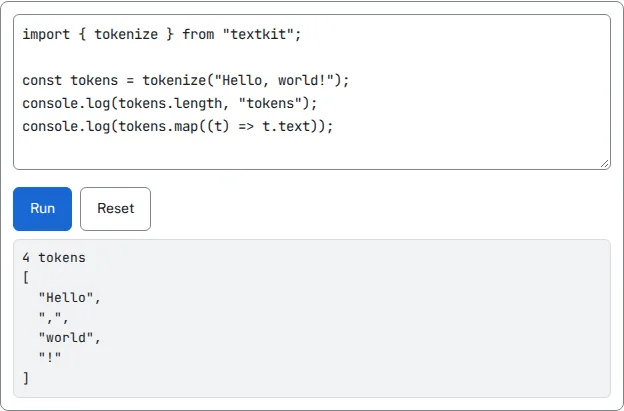
Every JavaScript @example becomes an editor with a Run button. The code runs
in a sandboxed frame with its own origin. It can import the package, print to
the console and throw, and it cannot see the page, its cookies or its storage.
A reader who wants to know what tokenize("Hello, world!") returns finds out
in one click instead of installing anything:
A REST API, from its OpenAPI file
1api_docs:
2  - openapi: api/openapi.yaml
OpenAPI 3.0 or 3.1, YAML or JSON. A fragment of the example in the repository:
 1paths:
 2  /tokens:
 3    post:
 4      tags: [Text]
 5      operationId: tokenize
 6      summary: Split text into tokens
 7      parameters:
 8        - name: keepSpace
 9          in: query
10          schema: {type: boolean, default: false}
11      requestBody:
12        required: true
13        content:
14          application/json:
15            schema: {$ref: '#/components/schemas/TextInput'}
16            example: {text: "Hello, world"}
17components:
18  securitySchemes:
19    apiKey: {type: apiKey, in: header, name: X-API-Key}
From a file like that you get a front page with servers, authentication and every endpoint, a page per tag, and a page of schemas. Parameters show their types, limits and defaults. Request and response bodies link to their schemas, with the file's examples or, when it has none, an example built from the schema.
Under each operation there is a Try it console. Pick the server, fill in
the parameters and the body, paste an API key or a token, and send. It shows the
status, the time, the headers and the body, and the same request as a curl
command. The key stays in the page's memory. It is never saved, and the curl
line shows <X-API-Key> instead of the key, so a screenshot of it is safe to
share.
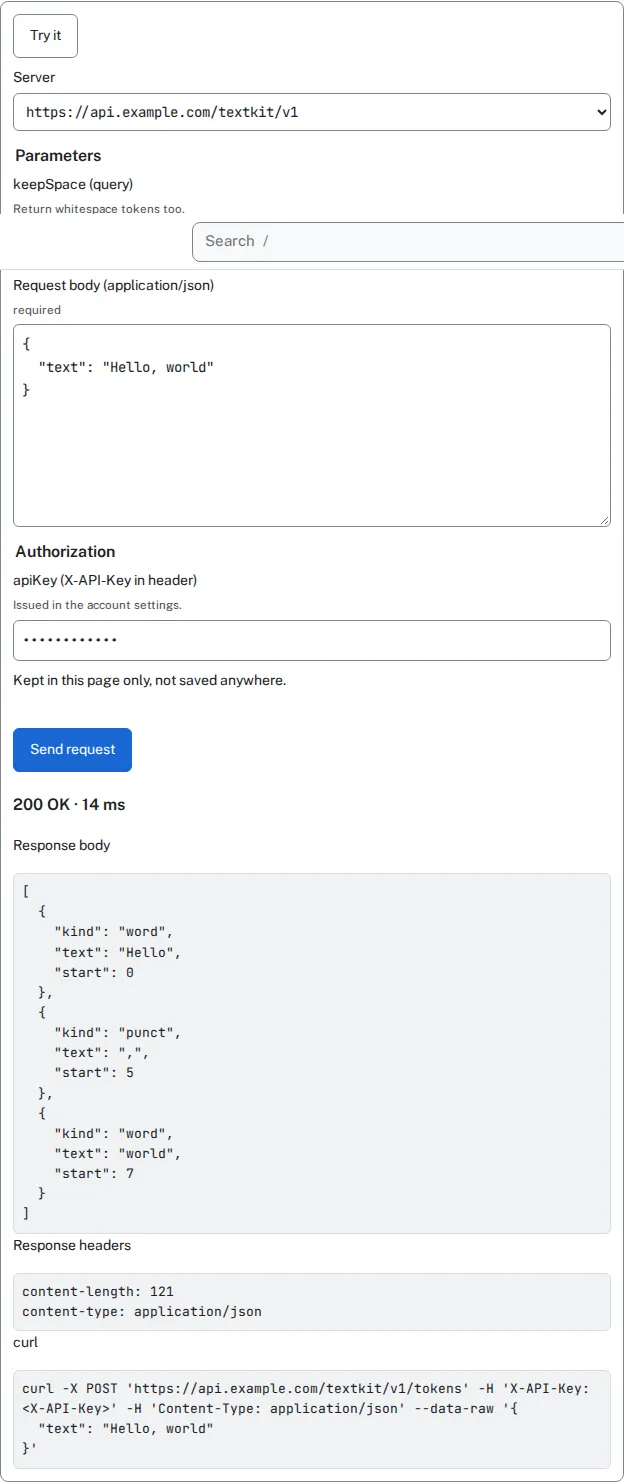
The request goes from the reader's browser to your API, which therefore has to
allow your docs site in CORS. When it does not, the console says so and still
hands over the curl command.
A theme made for this
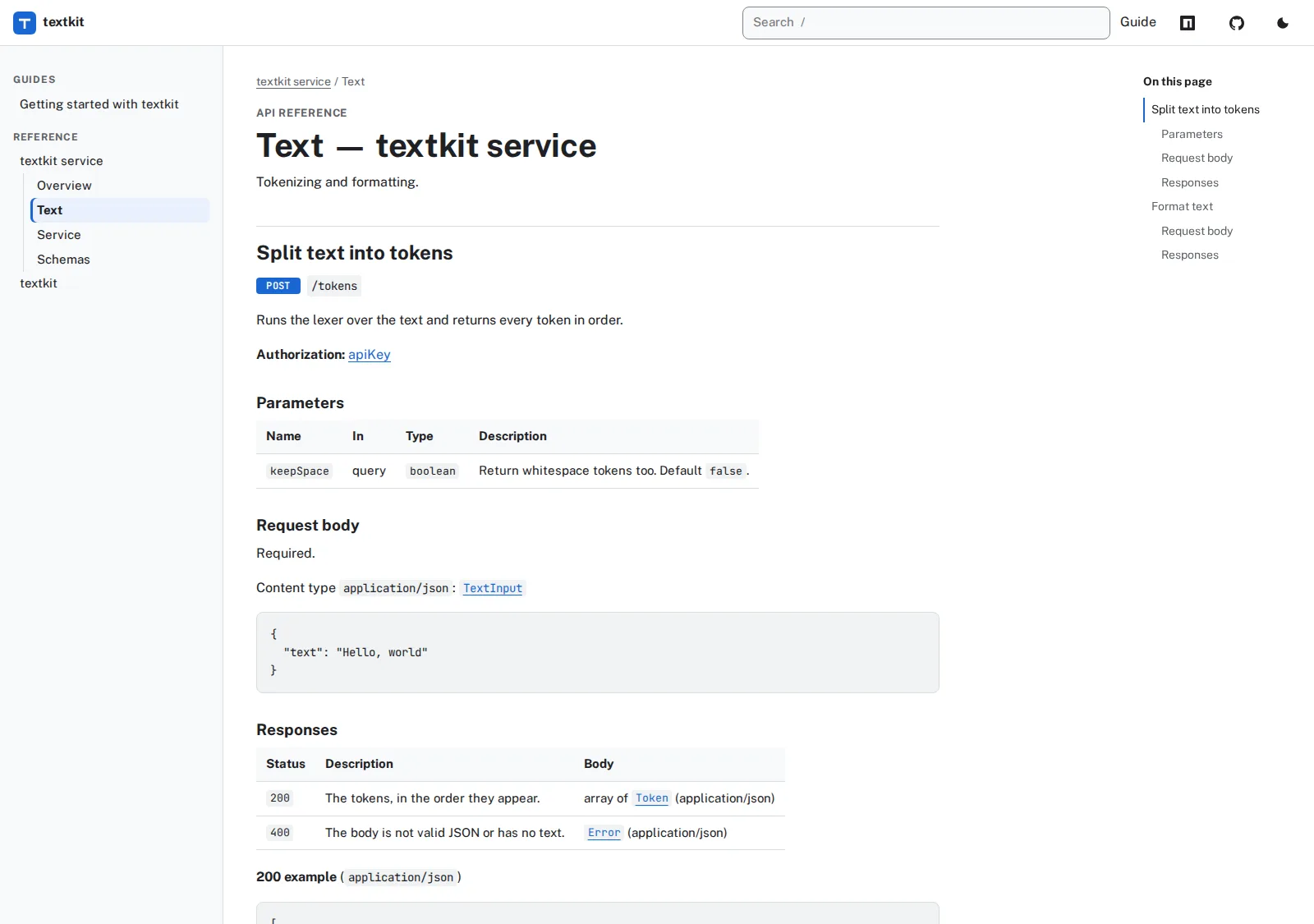
template: apidoc is a new built-in theme for documentation sites. Guides and
references share one sidebar, and the current package opens its tree there.
There is search on /, an "On this page" column, breadcrumbs, and a light and a
dark scheme. Every colour pair is measured against WCAG 2.2 AA and the numbers
are in the theme's README.
It carries your brand, not ours. The logo, favicon and social profiles come
from the marketing: settings every theme reads, and brand colours come from
colors:. The header takes your own links, with an icon where you name one,
and an icon for the repository. The footer says "Built with SSG" unless you set
ssg_credit: false.
 1template: apidoc
 2marketing:
 3  logo: /logo.svg
 4  social_profiles:
 5    github: https://github.com/example/textkit
 6    discord: https://discord.example.com/textkit
 7colors:
 8  primary: "#1967d2"
 9variables:
10  nav:
11    - {label: Guide, url: /getting-started/}
12    - {label: npm, url: "https://npm.example.com/package/textkit", icon: npm}
13  repository_url: https://github.com/example/textkit
The other themes are not left out. The live examples and the console are added by the build to any page that needs them, so ssgtheme, simple or your own theme show them too.
Try it locally
The repository has a working example: a small text library in JavaScript, Go, PHP and Python, and the REST service built on it, all documented side by side in one site.
1ssg --config examples/api-docs/ssg.yaml --http --watch
The guides are API docs from code and REST API docs from OpenAPI.